
By the Dropship Stair team. Last reviewed: November 2026.
Key takeaways
- Product photography for Shopify stores is the set of photos that shows buyers what an item looks like, how big it is, and how it works, since buyers cannot touch the product before they buy.
- Light matters more than the camera. Soft, even light and a plain background will beat a costly camera used in bad light.
- Show every angle that answers a doubt: front, back, detail, size, and the product in real use.
- Keep photos honest. The color, size, and finish in the photo must match what arrives in the box, or returns will follow.
Product photography for Shopify stores means clean, bright photos that show the true color, size, and detail of each item. Use plain backgrounds, natural light, and several angles, and show the product in real use so buyers can judge it with confidence.
What is product photography for Shopify stores?
Product photography for Shopify stores is the work of taking photos that sell a product to someone who cannot touch it. The photos must answer the questions a buyer would ask in a shop: what does it look like, how big is it, what is it made of, and how does it work. If the photos leave any of those questions open, the buyer hesitates, and a hesitating buyer rarely buys.
Good product photos do two jobs at once. First, they inform: true color, real size, visible detail, and the parts that matter. Second, they persuade: a well lit photo on a clean background makes the product feel worth its price, while a dark, blurry photo makes the same product feel cheap. Buyers judge quality from photos before they read a single word of the description.
Most stores need two kinds of photos. The first is the catalog shot: the product alone on a plain background, shot straight and clean, so buyers can compare items. The second is the lifestyle shot: the product in use, in a real setting, so buyers can picture it in their own life. Both matter, and this guide covers both.
What gear do you need for product photos?
You need less gear than you think: a phone or camera, a tripod, a plain background, and a light source you can control. A modern phone camera is good enough for most Shopify stores, and the money is better spent on light and a steady setup than on a costly camera body. Start simple, and add gear only when you hit a limit you can name.
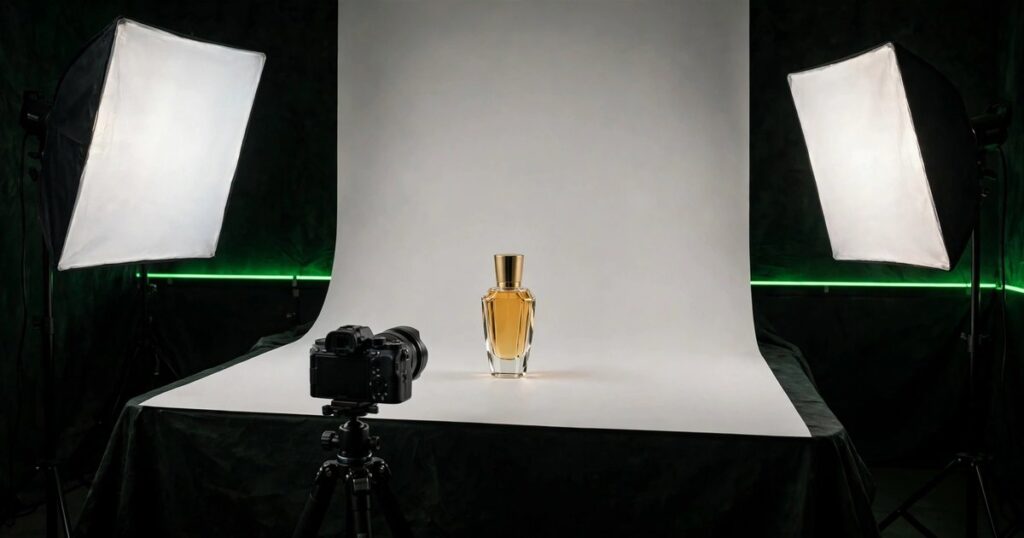
A tripod is the first buy, because it keeps every shot steady and at the same height, so your catalog looks consistent. A cheap phone tripod works fine to start. Next, get a white sweep: a large sheet of white paper or card curved against a wall, which gives you a clean background with no hard line behind the product. A small table, a white sheet, and a window can take you far.
How do you light product photos at home?
Light product photos with soft, even light from two sides, and avoid direct sun and the camera flash. The best free light is a large window on a cloudy day, or a window with a thin white curtain that spreads the sun. Place the product near the window, turn it until the light falls evenly, and shoot from the shaded side so the light wraps around the item.
When you use lamps, put one on each side of the product and aim them through a diffuser, such as white fabric or a sheet of baking paper, to soften the light. Hard light from one side makes a dark shadow on the other side, and the photo looks harsh. Two soft lights, set at the same height as the product, give an even result that shows the true color.
Watch the color of your light. Mixing warm room light with cool daylight makes the photo look yellow on one side and blue on the other, and the product color will be wrong. Use one kind of light for the whole shoot, set the white balance to match, and check the photo against the real product before you move on. A photo with the wrong color is worse than no photo, because it sets up a return.
Which angles and shots should every product have?
Every product needs a front shot, a back or side angle, a close up of the detail that matters, a shot that shows size, and at least one lifestyle shot. Five to eight photos per product is a good range, and each photo should answer a question the buyer has, not repeat a question already answered.
The front shot is the hero: straight on, centered, filling the frame, on a plain background. The back or side shot shows what the front hides, such as a zip, a clasp, or a label. The close up shows the material, the stitching, or the finish, and it is the shot that proves quality. The size shot puts the product next to a familiar object, such as a hand, a coin, or a book, so the buyer can judge scale.
For products with parts, show them apart and together. A bag with a strap should have one photo with the strap on and one with it off. A set should have one photo of the full set and one of each piece. Buyers cannot ask questions, so the photos must answer before the question forms. For ideas on presenting products well, see our pre-built Shopify store examples.
How do you edit product photos for Shopify?
Edit product photos by cropping to a square, fixing the brightness and the white balance, and removing dust or small marks, while keeping the color true to the real item. Editing should make the photo look like the product on its best day, not like a different product. If the edit changes the color, you have gone too far.
Work in this order: crop first, then fix exposure, then fix color, then clean up spots. Cropping to a square keeps your catalog neat, because Shopify collection pages and ads crop to squares anyway. Brighten the photo only until the product looks like it does in good daylight, and check the result on a phone screen, since that is where most buyers will see it.
Save the files right. Export as JPG at good quality, around 2048 by 2048 pixels for the main images, and keep each file under a few hundred kilobytes so the page loads fast. Name the file after the product, with plain words and dashes, because a clear file name helps search and helps you find the image later. For more on keeping pages fast, see our guide on Shopify store speed optimization.
| Shot | What it shows | Background |
|---|---|---|
| Front hero | The product, straight on | Plain white |
| Back or side | What the front hides | Plain white |
| Close up detail | Material, stitching, finish | Plain white |
| Size reference | Scale next to a known object | Plain white |
| Parts or set | Pieces apart and together | Plain white |
| Lifestyle in use | The product in real life | Real setting |
Use the table as your shot list for every product. Shoot the five plain background shots first, then the lifestyle shot, and check each one against the real product before you move on.
How do you photograph products for lifestyle shots?
Shoot lifestyle photos by placing the product in a real setting where the buyer can picture using it: a bag on a chair by a door, a mug on a desk next to a book, a skincare bottle on a bathroom shelf. The setting should be tidy, bright, and true to the buyer life, not a staged scene that looks like an ad from another brand.
Use a person when the product needs one. A bag worn over a shoulder, a watch on a wrist, or a jacket on a model tells the buyer more about fit and size than any flat photo. Keep the person natural and the product the focus: the model should show the product, not compete with it. If you cannot hire a model, use your own hands or a friend, and keep the framing tight on the product.
The costliest mistake is a photo that lies about the product: wrong color, wrong size, or a finish that looks better than the real thing. Buyers who feel misled return the product and leave a bad review, and the review will warn the next buyer. Always compare the finished photo with the real item in good light before you publish it.
The next mistake is too few photos, or photos that all show the same angle. One front shot cannot answer questions about size, detail, or the back of the product, so buyers guess, and guessing leads to returns. Five to eight photos, each with a job, is the range that answers doubts without slowing the page.
Finally, do not mix styles across the store. A catalog where half the photos are bright and square and half are dark and cropped at random looks unfinished, and buyers read unfinished as untrustworthy. Set one style, write it down, and follow it for every new product. If the photos still feel weak after that, a fresh store design can help, and Dropship Stair builds WordPress store design projects and offers SEO services. See our custom Shopify store design page or reach the team through contact us.
Frequently asked questions
Can I shoot product photos with a phone?
Yes, a phone takes photos good enough for most Shopify stores, if the light is good and the phone is steady. Use the rear camera, clean the lens, tap to focus on the product, and avoid the digital zoom. A tripod and good light matter more than a costly camera.
What background is best for Shopify product photos?
Use a plain white or light grey background for the main product shots, because it keeps the focus on the item and matches most Shopify themes. Save colored or textured backgrounds for lifestyle shots. A white background also makes the product easy to cut out for ads and social posts.
How many photos should each product have?
Five to eight photos per product is enough: a front shot, a back or side angle, a close up of detail, a size reference, and one or two lifestyle shots. More photos help when the product has parts, colors, or a size that is hard to judge from one image.
What size should Shopify product images be?
Shopify works best with square product images around 2048 by 2048 pixels, saved as compressed JPG files. Square images crop well on collection pages and in ads, and the high resolution keeps the zoom sharp. Keep each file under a few hundred kilobytes so the page loads fast.
Should I hire a photographer or do it myself?
Do it yourself when the budget is tight and the products are simple, and hire a photographer for hero shots, lookbooks, or products that are hard to light. A good middle path is to shoot the catalog yourself and hire a pro for the homepage and launch photos.
Product photography for Shopify stores is a skill any store owner can learn with a phone, a tripod, and good light. Shoot every angle that answers a doubt, keep the color true, edit lightly, and show the product in real use. Do that for every product, and the photos will start selling before your words get a chance.
Sources: the Dropship Stair guides linked in this article, and Shopify image guidance checked during research in November 2026.